VAT and Currency Evidence
VAT and currency handling are compliance-sensitive. Review them before export.
VAT Sources
VAT can come from four sources:
- Import: initial bank/CSV data.
- AI: receipt analysis.
- Vendor: a VAT vendor set in Settings, which decides before the receipt.
- Manual: user edits.
Manual changes should be treated as intentional and preserved.
Monzo VAT
Monzo imports default VAT conservatively because the CSV does not provide detailed VAT fields. Use receipt evidence and manual review to confirm VAT.
Revolut VAT
Revolut imports can detect explicit VAT from tax columns. A tax label with no amount, or one that says there is no VAT, gives no VAT.
AI VAT Analysis
GrantKeeper reads each receipt during the import and sets VAT from what it shows. A printed VAT amount is used as printed. Where none is printed, VAT is included only for a standard-rated purchase from a seller shown to be UK VAT-registered. See Review VAT for the rules.
VAT that a receipt does not print is an estimate from what was bought, and a faintly printed figure can be misread. Check VAT on unusual purchases before you export.
Total Ex-VAT
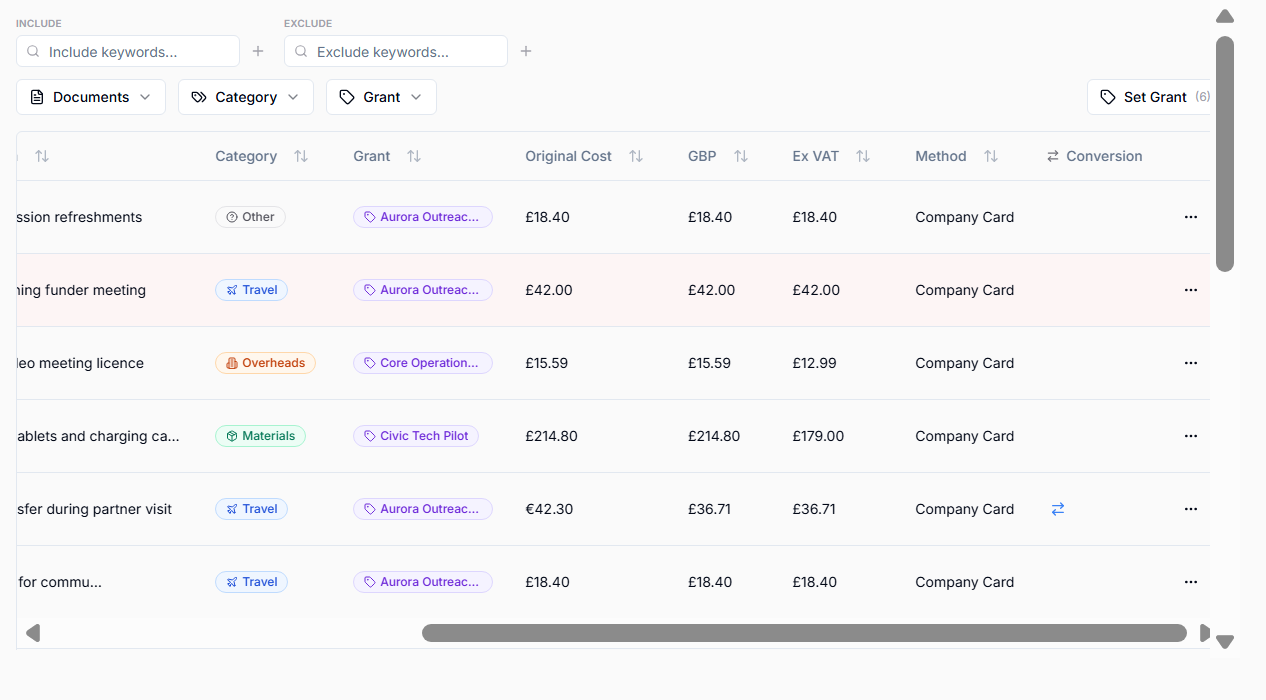
If VAT is included, total ex-VAT is the GBP total less the VAT read from the receipt. Where the receipt prints no VAT amount, one sixth of the total is removed (20 percent VAT). For a purchase in another currency, the VAT is converted at the same rate as the bank charge.
If VAT is not included, total ex-VAT equals total GBP.
Currency Evidence
For non-GBP transactions, GrantKeeper can generate Mastercard conversion evidence.
Check that:
- original currency is correct,
- original cost is correct,
- total GBP is correct,
- conversion rate is sensible,
- evidence exists and opens.
If conversion evidence fails, check whether the date is in the future or incorrect. Fix the purchase date and regenerate or refetch evidence.